

Hack4Impact
Role
Project Manager
UX Researcher
UX Designer
Team
2 Project Managers
2 Designers
Timeline
Winter 2024
Tools
FigJam
Figma

Overview
What is Hack4Impact?
Hack4Impact is a national, student-run collegiate organization that develops digital software solutions for local non-profits. Through their partnership with local clients, they empower student engineers and designers to create lasting social change while encouraging students to use technology for social good.
For this 8-week project during the winter of 2024, our primary point of contact was Khoa Ly, one of the executive directors of Hack4Impact’s Cal Poly SLO branch.
The Problem
All these problems produced an overwhelming and visually dull experience that did not help guide users or engage them with what the organization had to offer.

🧭
Unclear Navigation

Unclear page indicators, no dropdowns, and cramped layout made it hard for users to move through the site.
🎨
Visual
Design Issues
Limited color palette, overly bright background, and buttons without clear feedback reduced usability and engagement.
🔍
Difficulty
FInding Information
Key details like application timelines were difficult to locate, leaving users frustrated and unsure.
Problem Statement
How might we create a comprehensive website redesign that is intuitive and functional, accompanied by an updated design system that establishes a cohesive online presence honoring Hack4Impact's mission of developing digital solutions for non-profits while encouraging students to use technology for social good?
Deliverables
Our deliverables consisted of the following:
Our deliverables consisted of a full website redesign and an updated design system for Hack4Impact at Cal Poly SLO.
Our redesign focused on improving the user experience and navigation of the site to increase ease of use and functionality. It also utilized our updated design system that was created to reflect the Hack4Impact brand, while also incorporating aspects that are distinct to the Cal Poly SLO branch.
Research
We began our research with a team discussion to identify initial observations about the site’s design, branding, and visual tone, which informed the focus of our user interviews. We then conducted impartial, non-leading interviews to gather honest feedback on usability, clarity, and overall impression, intentionally speaking with participants outside the UX/UI field to capture diverse perspectives. These interviews highlighted the following key findings:
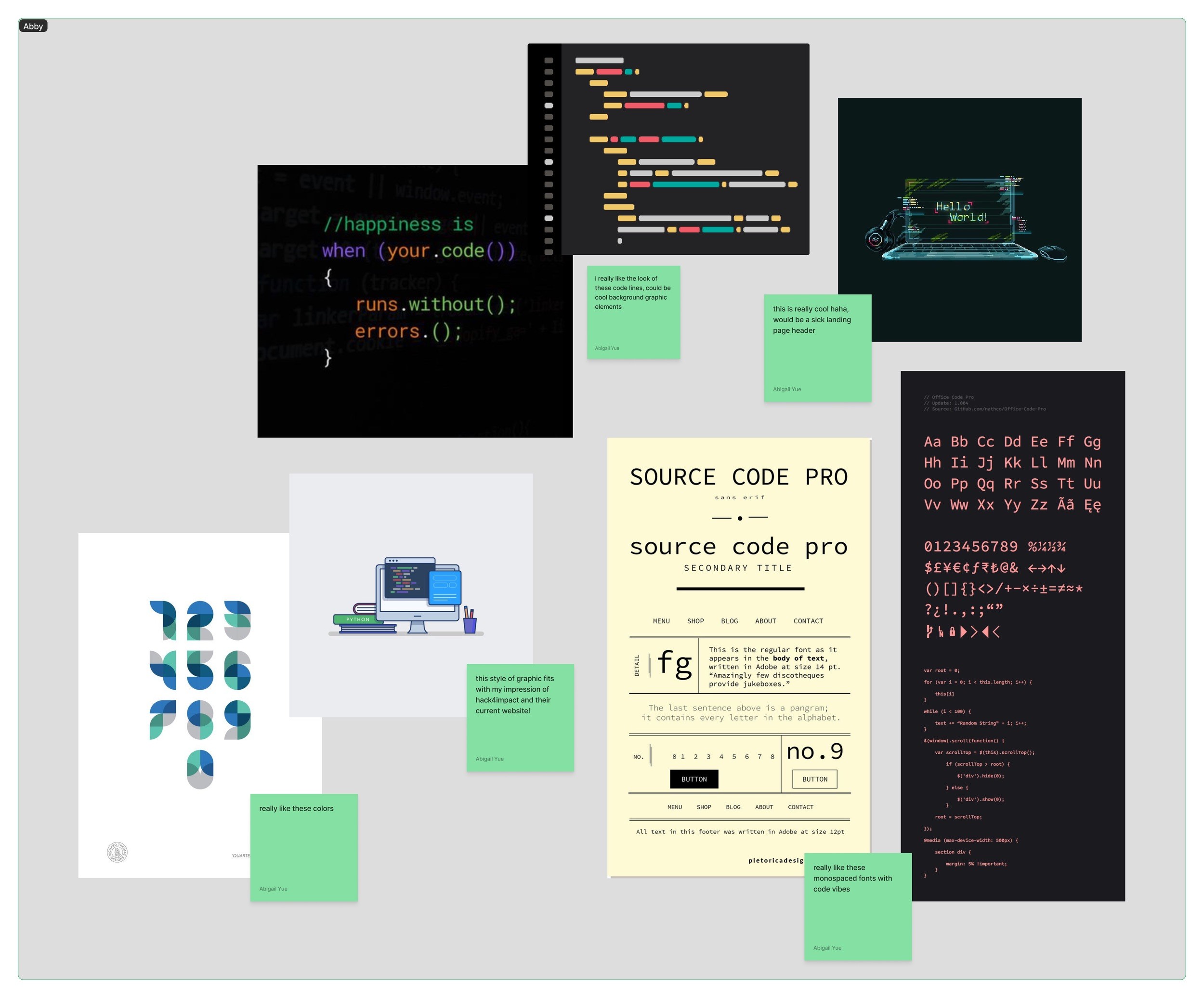
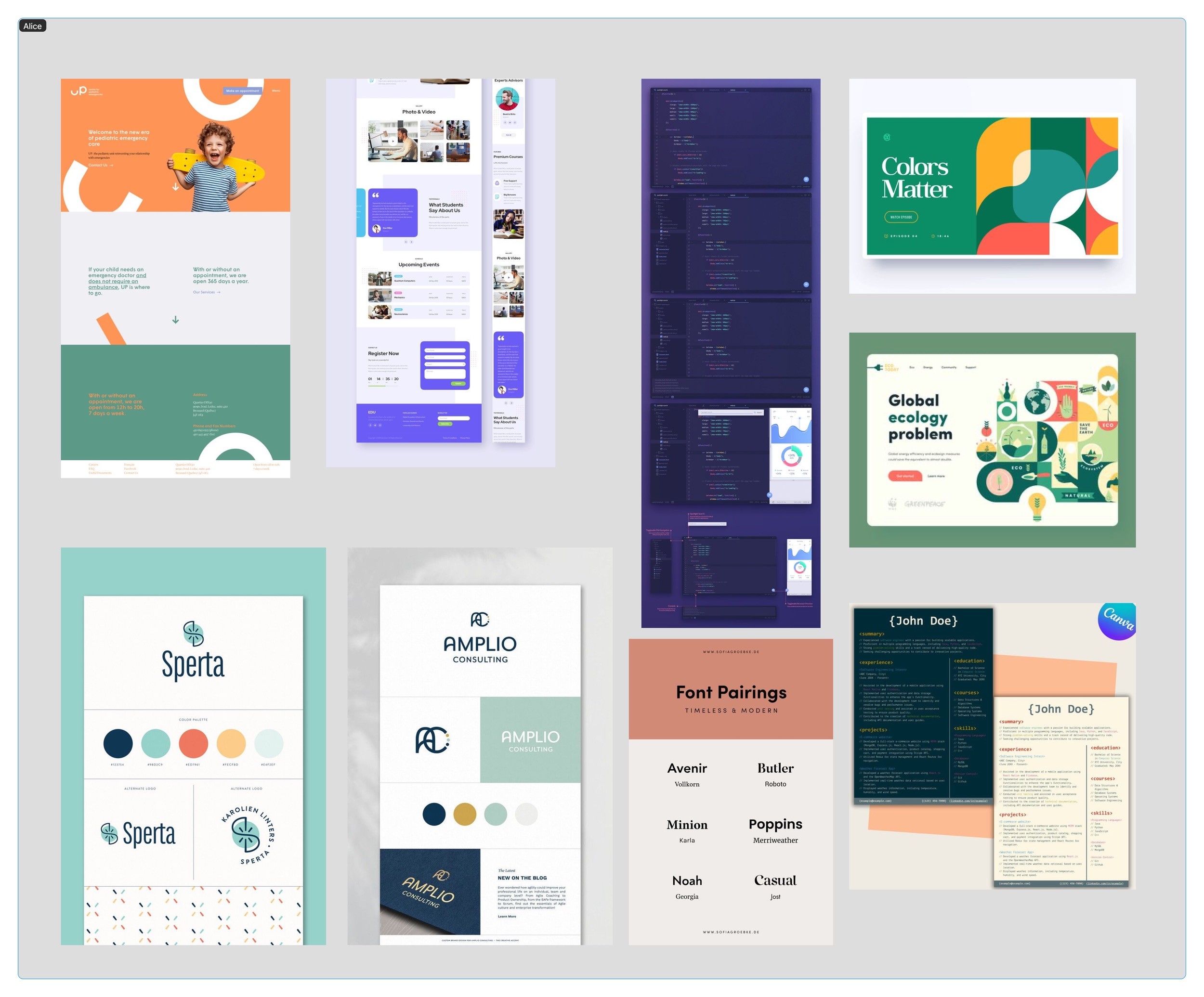
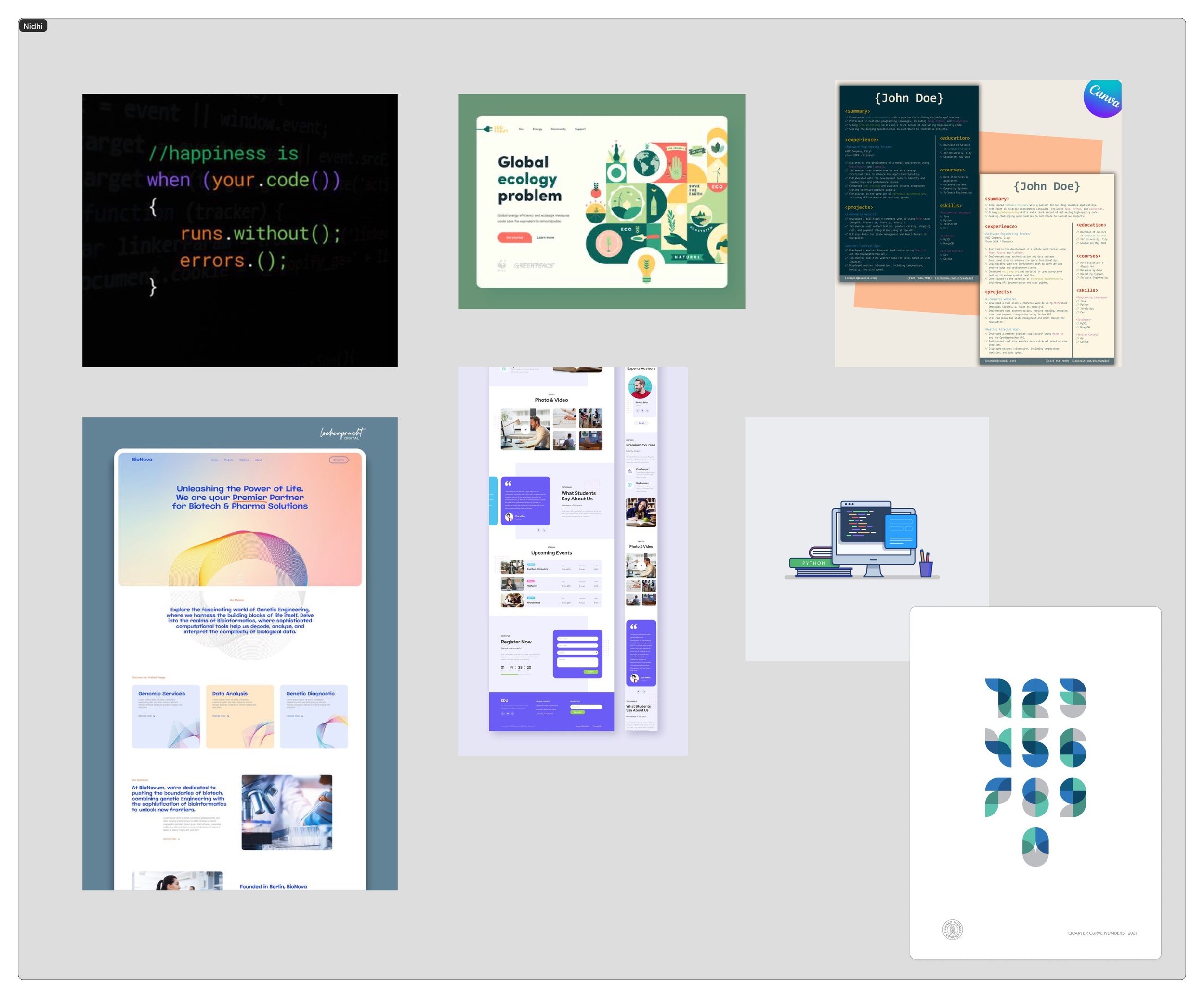
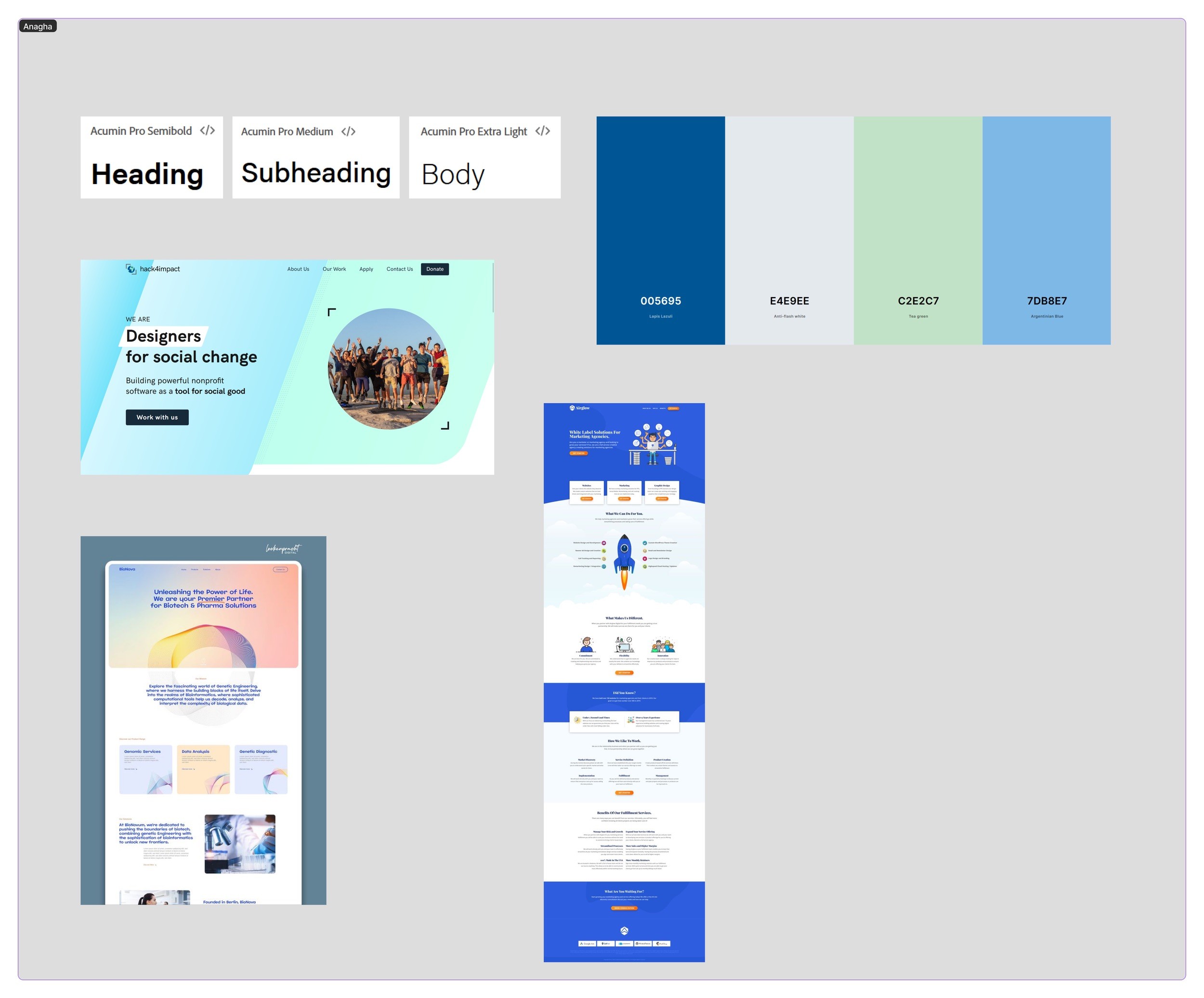
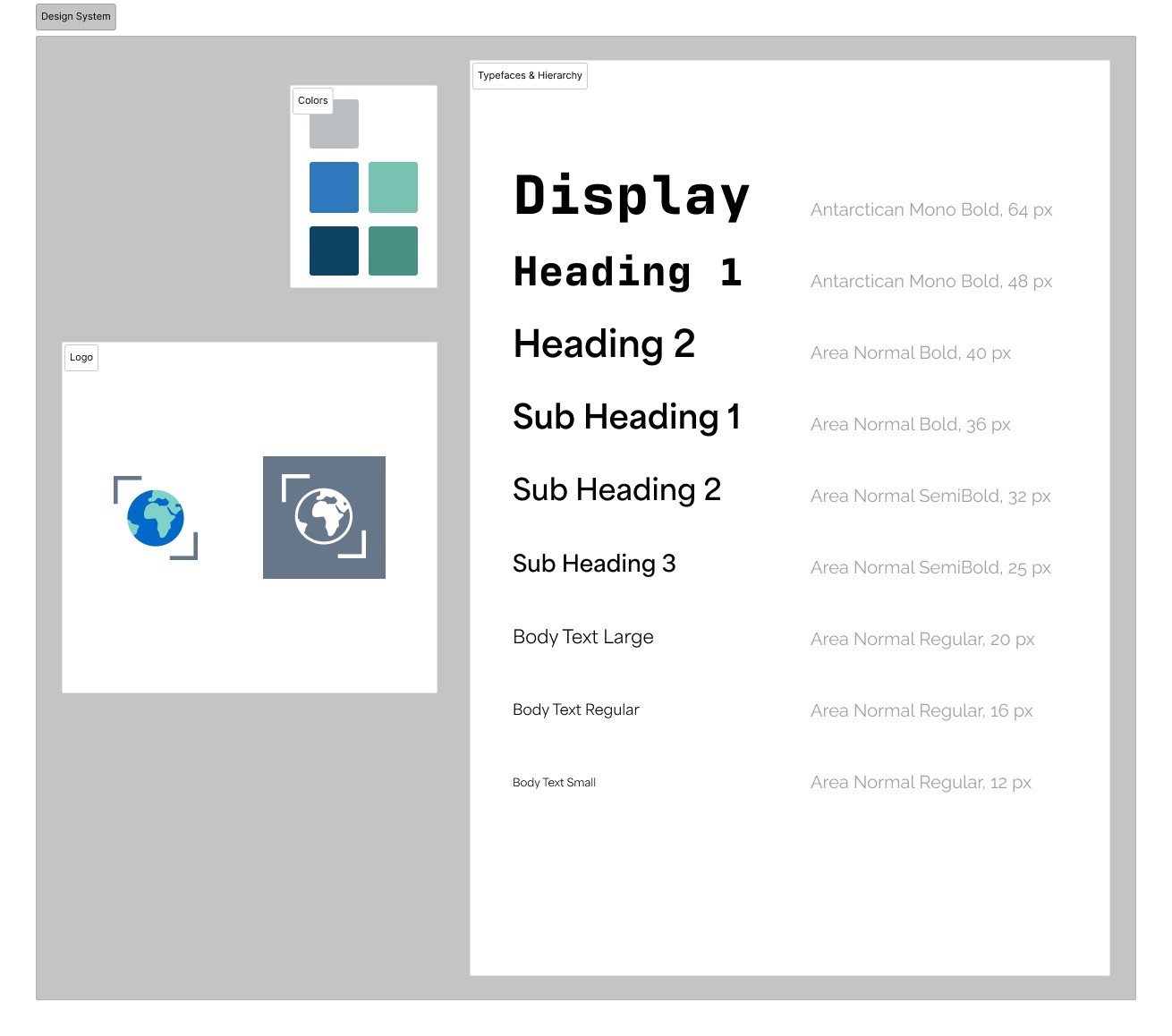
For our updated design system, we brainstormed potential colors, fonts, icons, design elements, etc.
In the bottom right box, we created a master mood board where we combined all the ideas that we liked as a group and wanted to apply to our redesign. Overall, we had a vision for our key colors to include blue, green, and neutral colors to balance them.
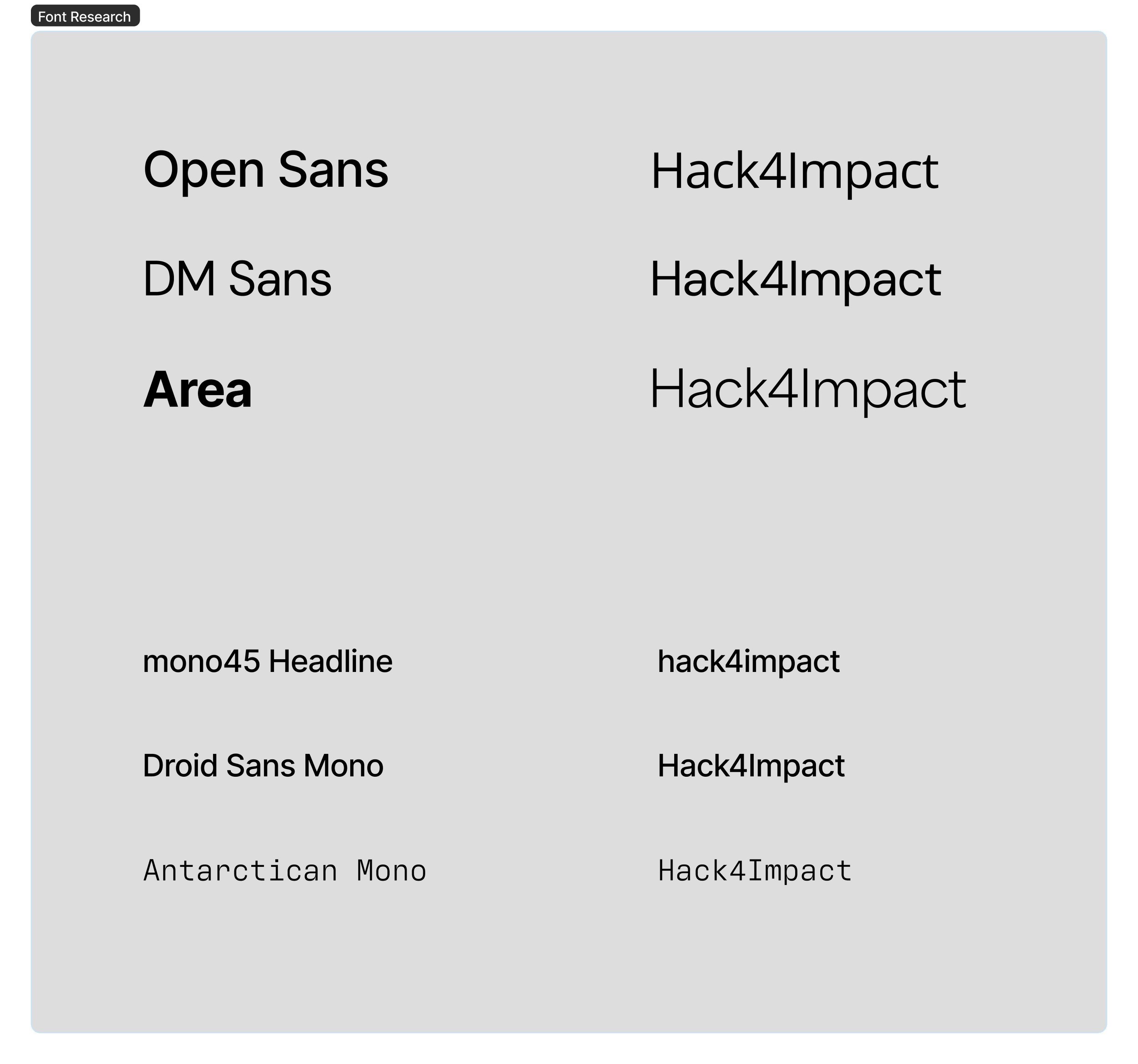
Our team started with researching and listing numerous types of Adobe fonts and filtered them down by considering carefully their tone, x-height, and width to create a unified design. Our vision was a friendly and approachable appearance and a typeface that was a sans-serif, but included a contrasting decorative font. To start with, we were drawn by the Antarctican Mono that has a nuanced code like design, but modified it according to the feedback provided by the client to prevent too technical of a feeling. Finally, we chose the Antarctican Mono as our primary headings font and Area as our body text.
My Area of Focus
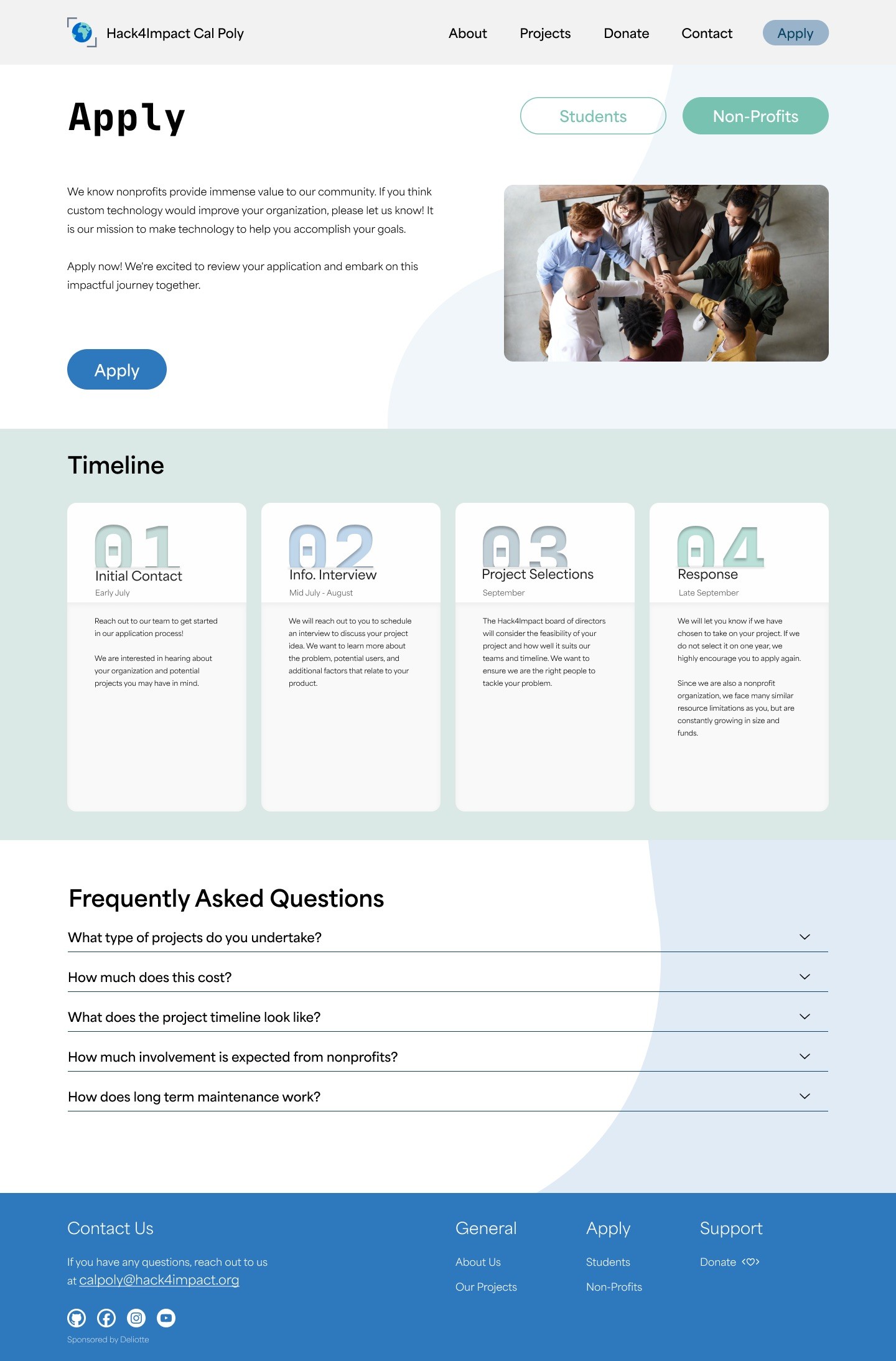
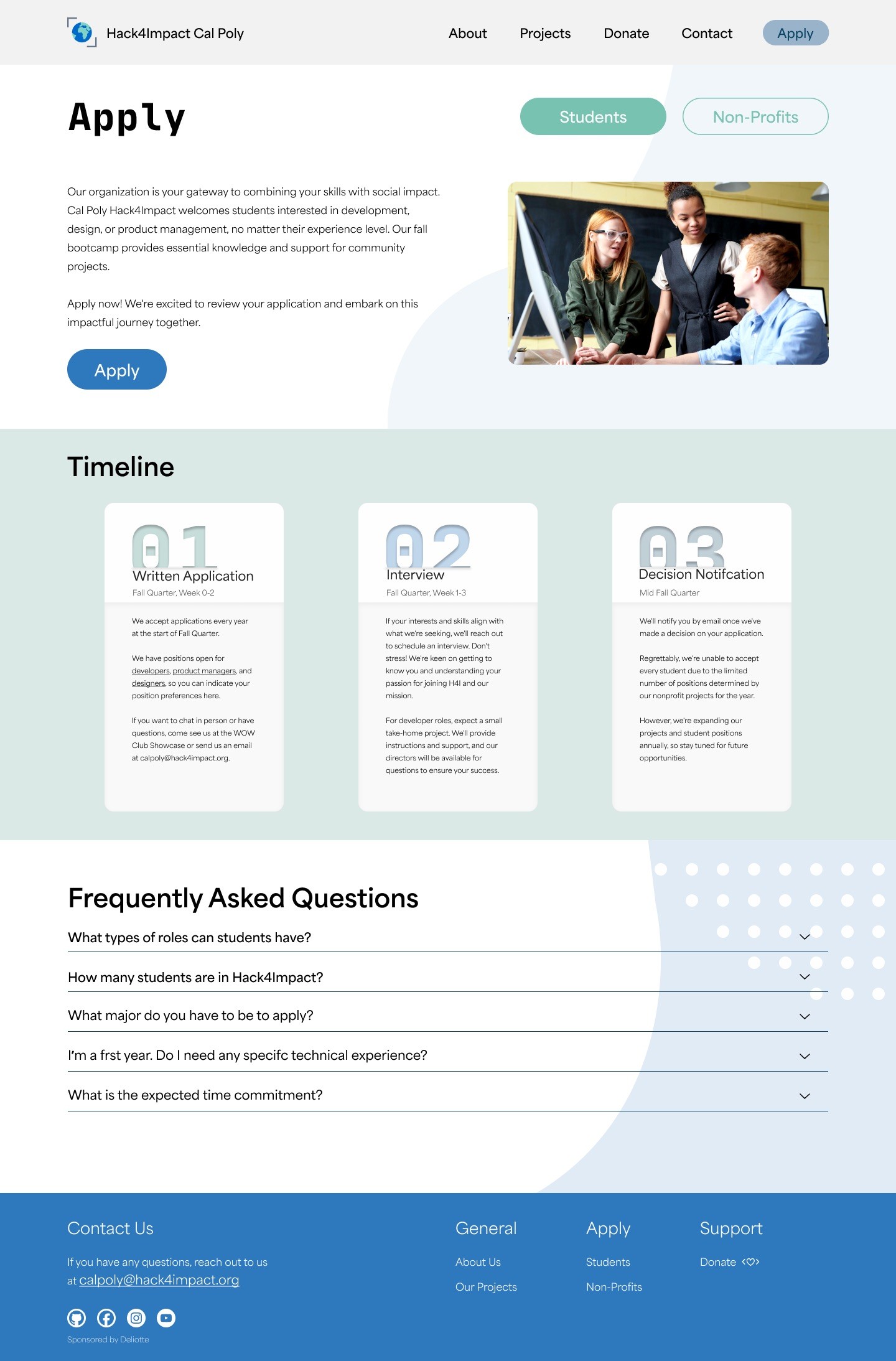
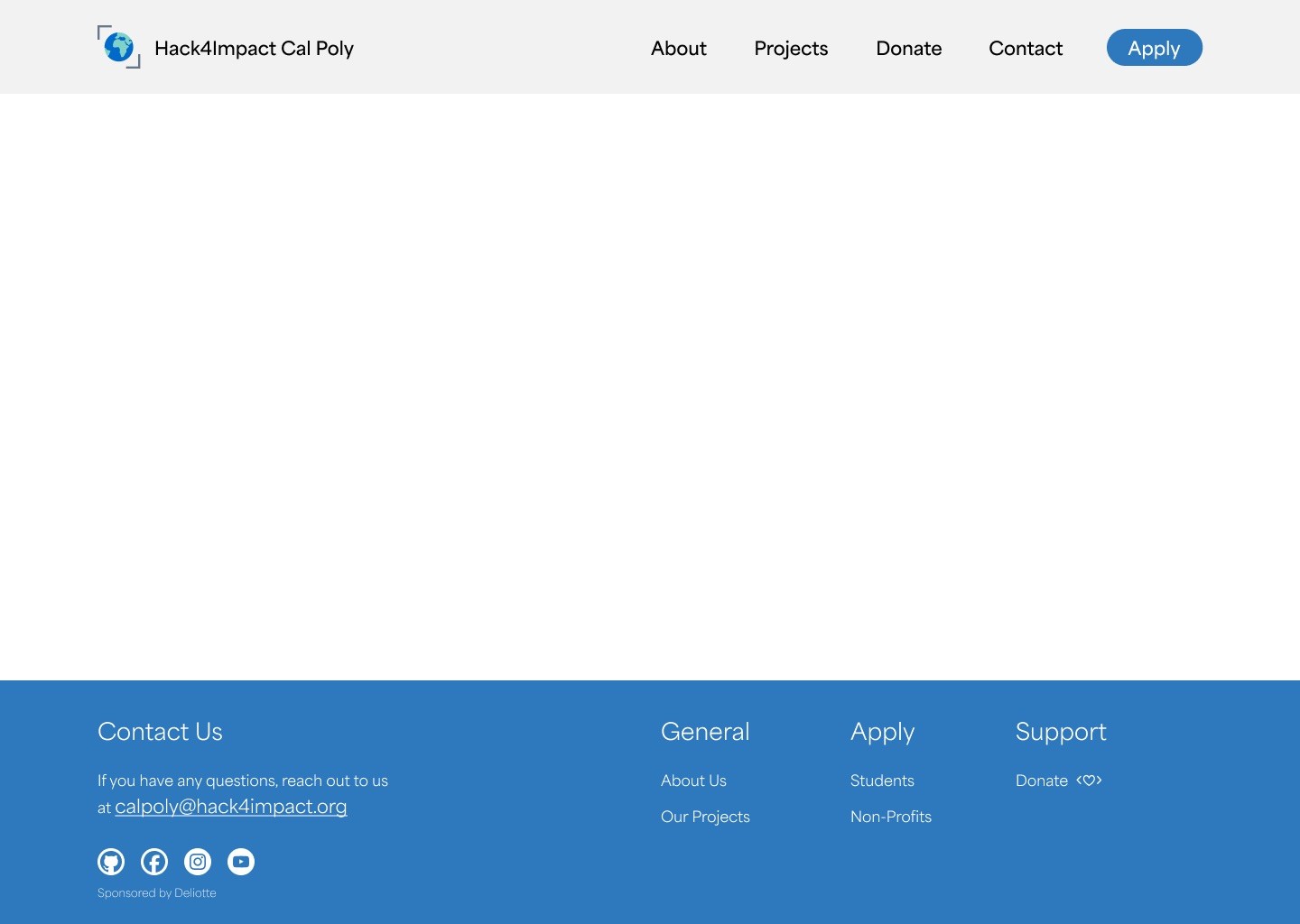
I was tasked with designing the Apply page for students and non-profits, focusing on creating a clear and intuitive user experience. I also worked on smaller interface components, including the navigation bar and footer, to ensure consistency and usability across the platform.
I proposed the use of background details like abstract forms and dot patterns to provide a visual depth and balance to the layout. These aspects served to soften the stark white background and make natural divisions between portions and made the content easier to navigate and the interface more interesting to look at altogether.
The next section showcases my early design iterations through to the final solution, including the contributions from the rest of the team.
User Interviews
Prominent "Apply" button
Project info prioritized over team links
FAQ/navigation improvements
Sticky nav & visuals
Users want a more engaging, user-friendly experience
Client Notes
Blue and green palette to match Hack4Impact logo
Monospaced display type for coding vibe
Sans-serif body text for readability and friendliness
Followed existing site structure for consistency
Competitors
Stanford CS+Social Good
Develop for Good
Bits of Good
Cal Blueprint
Moodboard
Storyboarding + Wireframing
Our process involved splitting website pages amongst our team members and doing quick storyboard sketches. This helped us visualize what we wanted the site to look like as a whole, and ensured that we were all on the same page in terms of visual elements.
Design
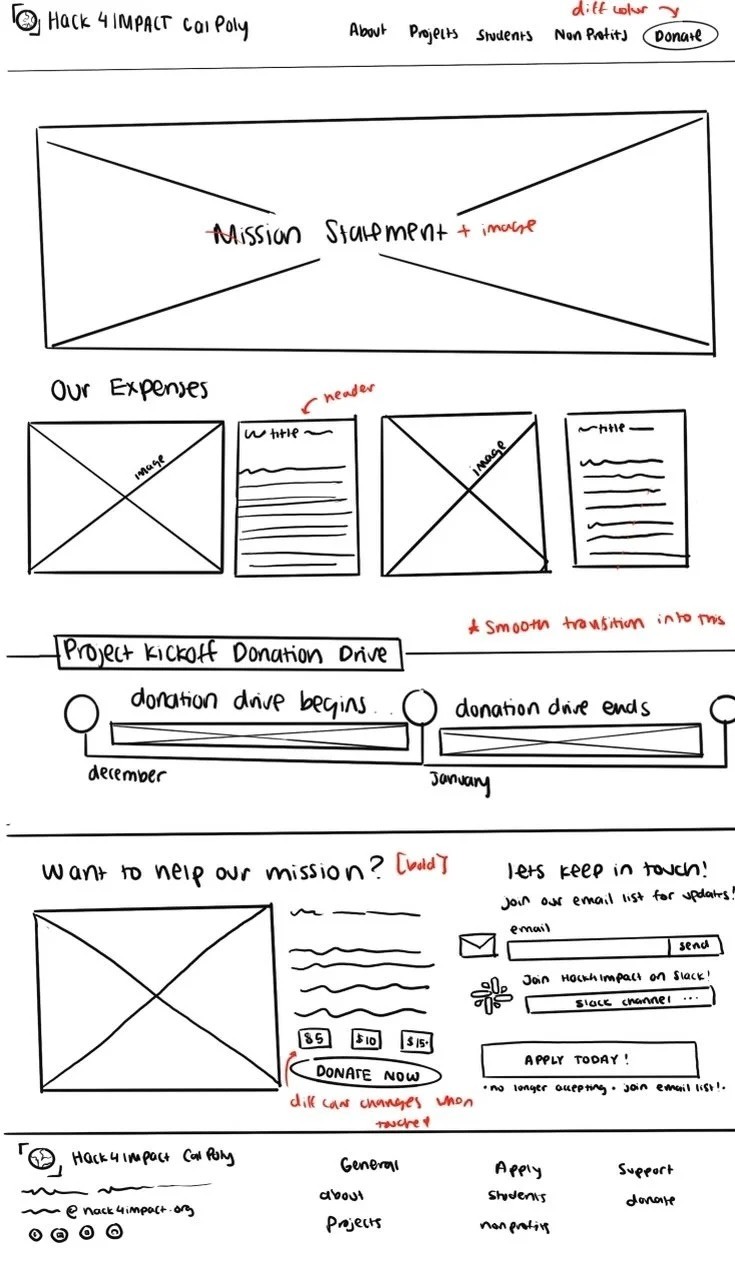
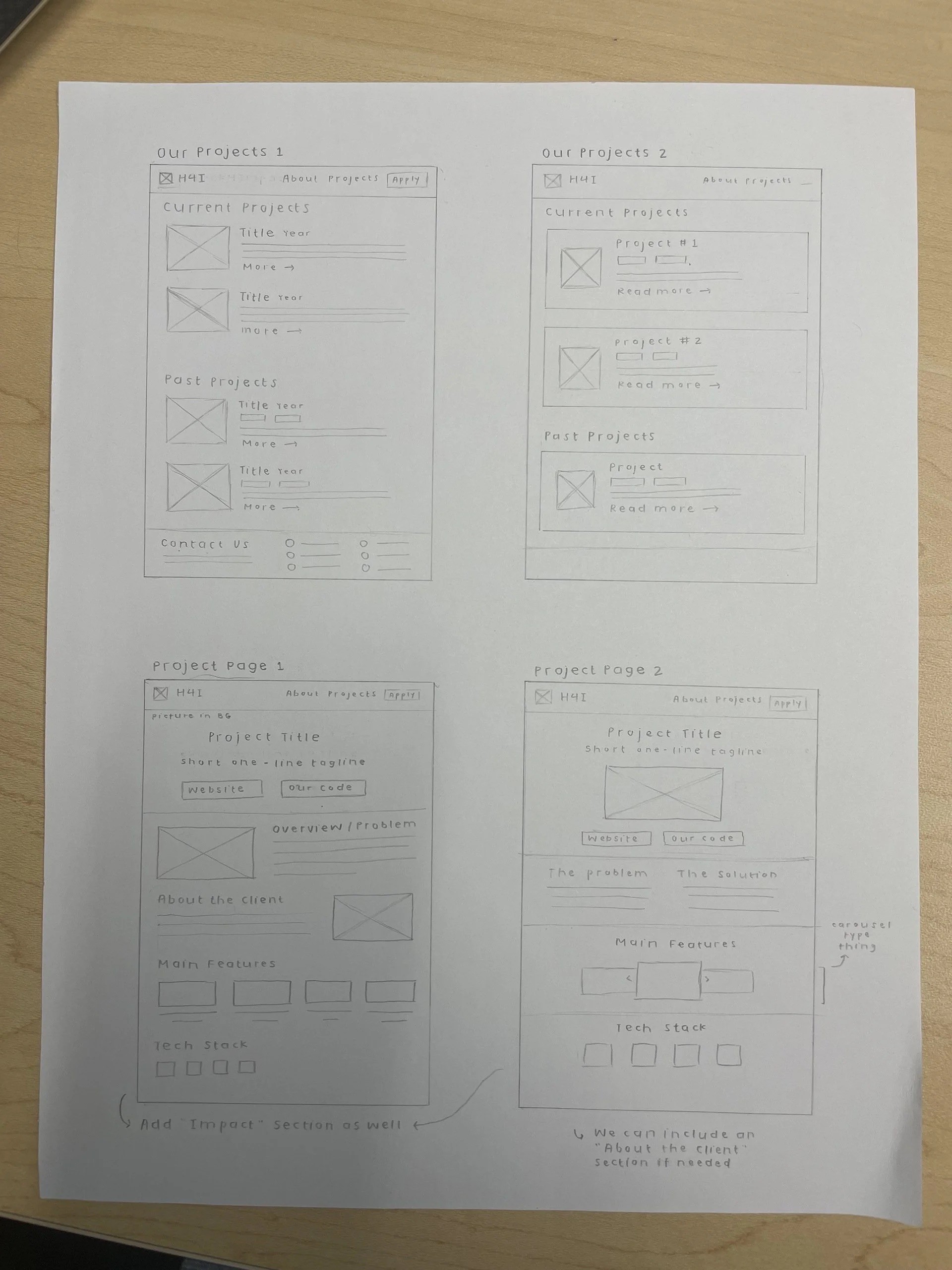
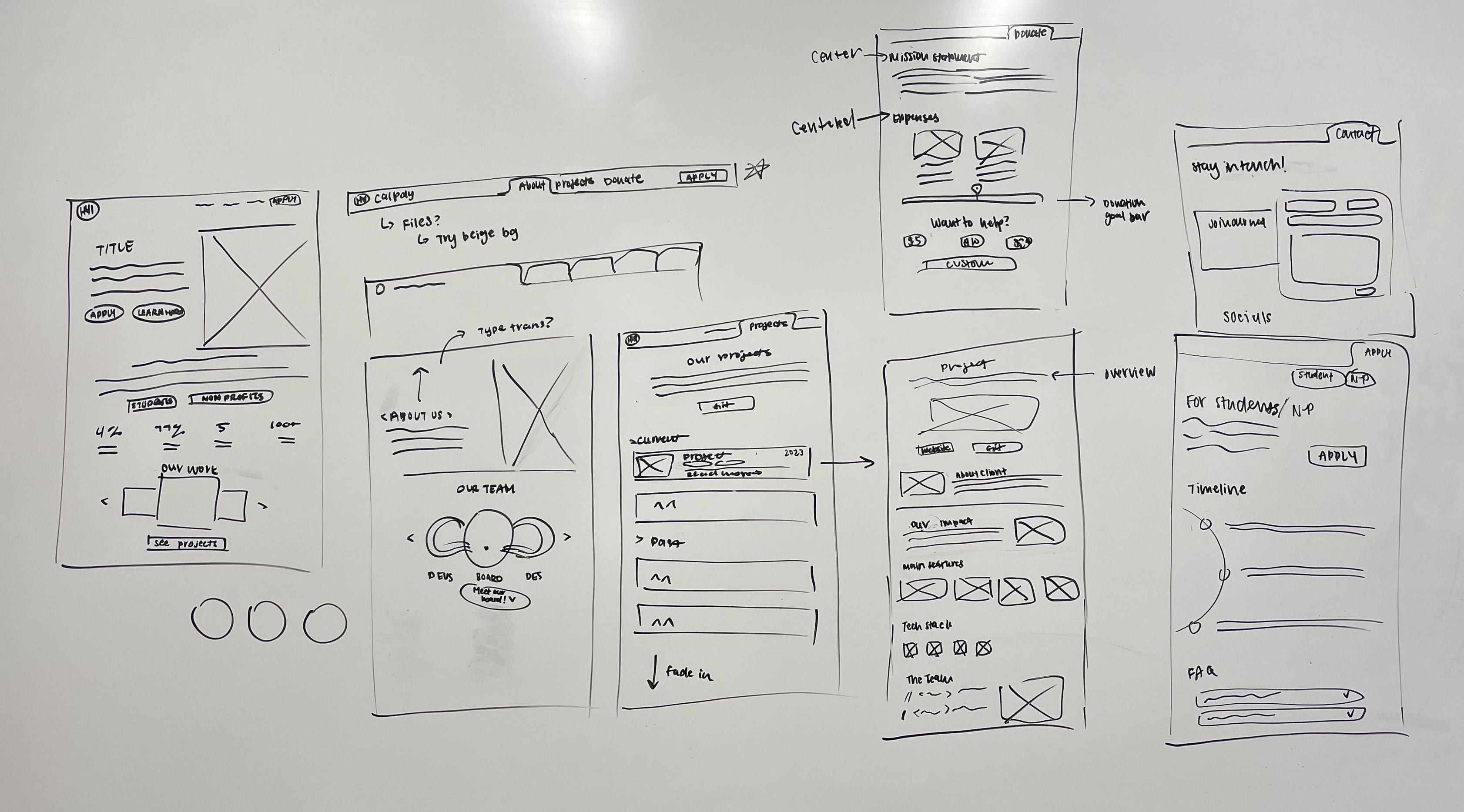
After storyboarding, we created a wireframe sketch overview of the entire site. As a team, we reviewed everyone’s individual storyboards and discussed the visual elements we wanted to incorporate and keep consistent throughout each page. We laid out our first iteration of the website’s flow, as well as how buttons and page elements would interact with each other as a user navigates through the site.
Design System
Lo-fi Wireframes
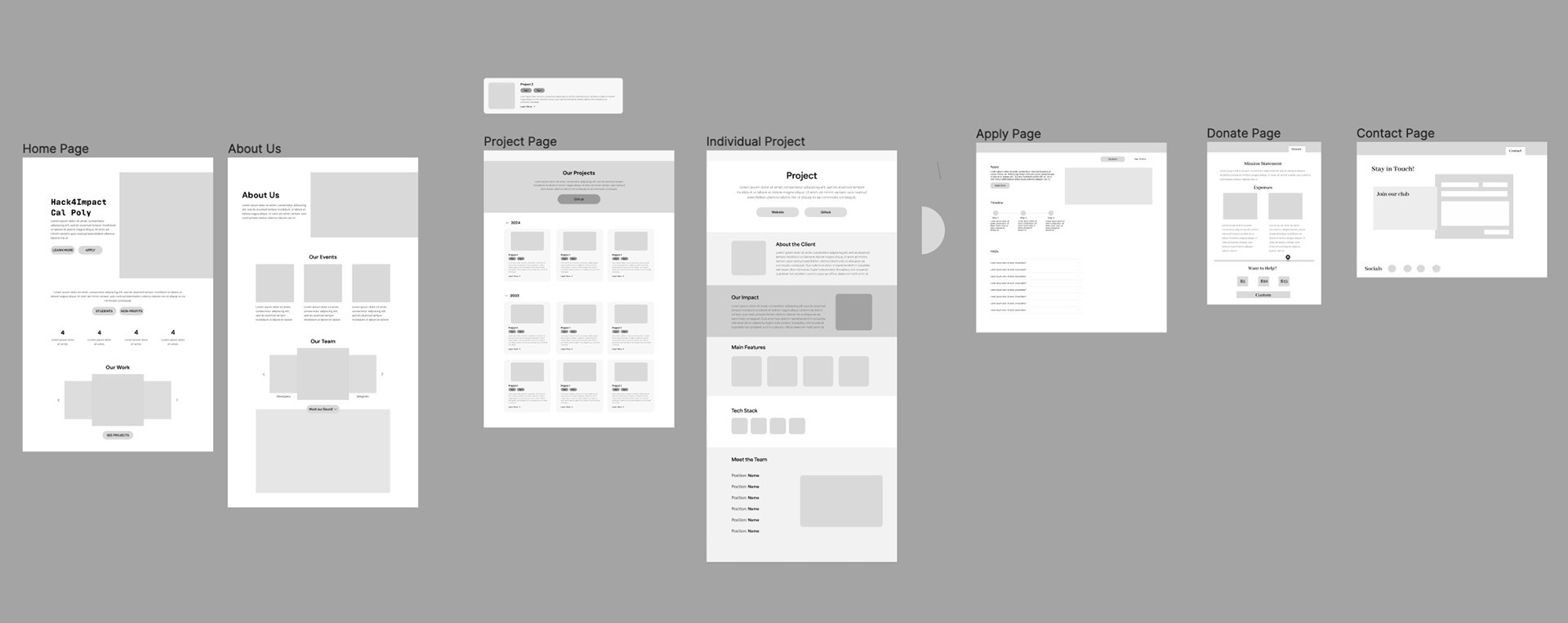
In this stage, we created a low-fidelity wireframe prototype of the website in Figma. This allowed us to visualize the site in a digital format, and focus on the core interface of the new website. Here, we also set uniform guidelines for page grids, type size and leading, button sizes, and general page headings.
Mid-fi Wireframes
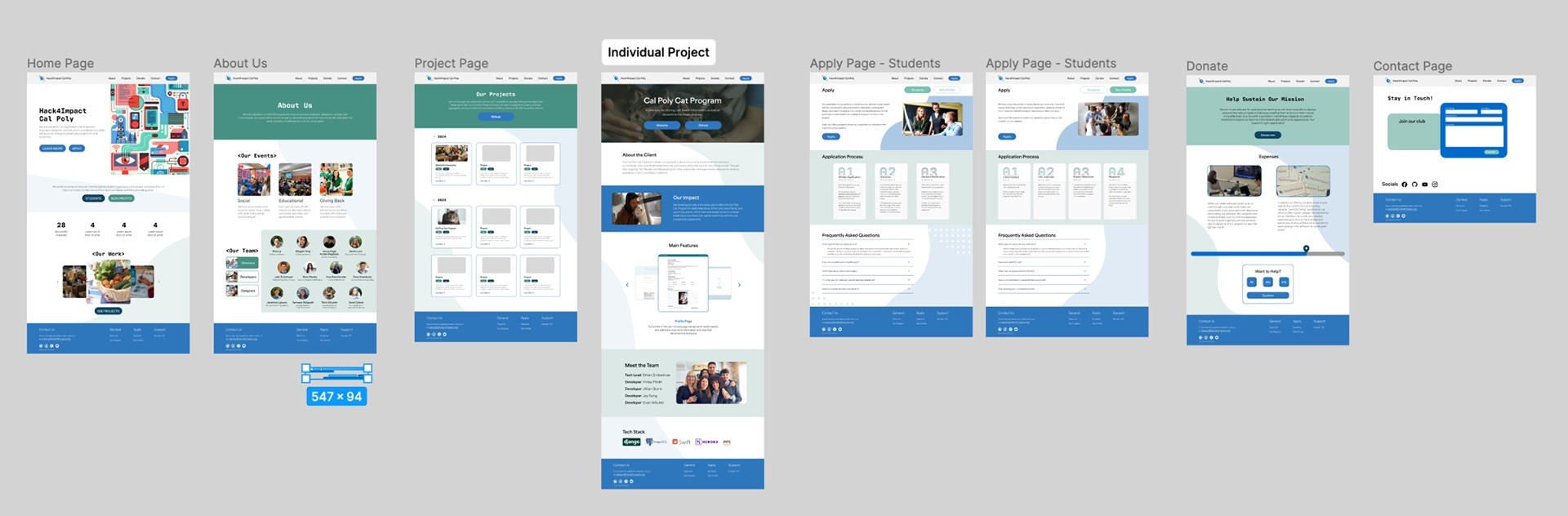
At the mid-fidelity stage, we translated our wireframes into interactive Figma screens using our design system. This ensured consistency in page grids, typography, button styles, and headings, while refining layout and content placement to better represent the final interface.
Solution
For Hack4Impact, we redesigned the site to provide a better and unified user experience. Addressing concerns given by users we interviewed, we could resolve the major issues including an overly bright background and the absence of visual indicators of the page that the user was on. The redesign made navigation more straightforward, the page hierarchy more logical, and color palette is more balanced to make the page easier to read and navigate.
The content structure was also improved by introducing the FAQ section in the Apply page to enable customers to get quick answers, a step by step application process which was also visual, and more enriched project pages. A call-to-action was visible on the new homepage, which directed prospective visitors to participate or know more about the work the Hack4Impact is doing.
Final Prototype


Client Testimony
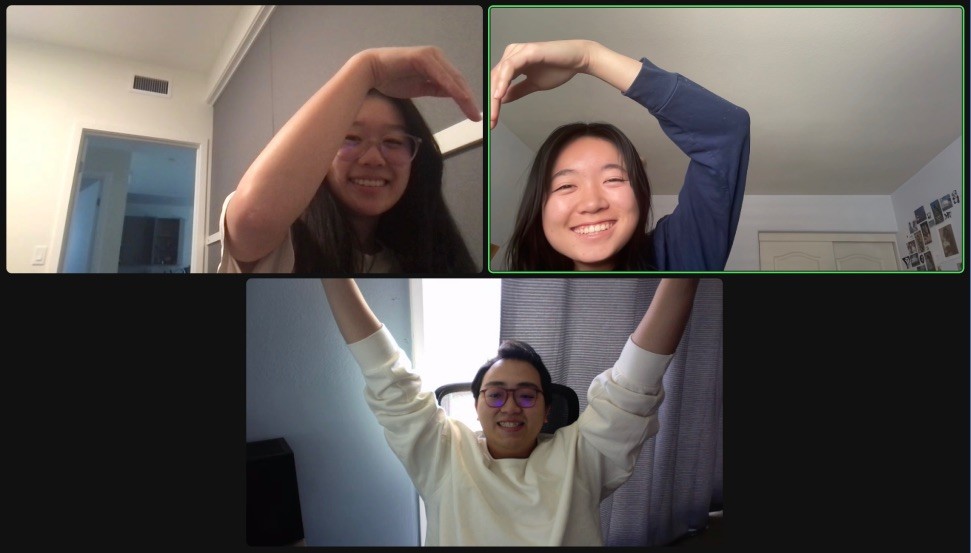
Our client was delighted with the designs we presented, and their positive, constructive feedback played a crucial role in ensuring the project progressed smoothly. Khoa had also proposed the idea of applying our design system beyond the Cal Poly chapter and implementing it across the entire Hack4Impact organization. We are excited to see the impact our work will have on the Hack4Impact organization moving forward!
Say hi to Khoa! :D
Takeaways
Team Collaboration & Task Management
Dividing responsibilities and giving constructive feedback kept the small team motivated, ensured deadlines were met, and prevented overwhelm.
Knowledge sharing
Leveraging varied Figma experience, the team adopted a learning mindset, freely sharing skills to keep everyone aligned and on track.
Reflection

Hack4Impact
Role
Project Manager
UX Researcher
UX Designer
Team
2 Project Managers
2 Designers
Timeline
Winter 2024
Tools
FigJam
Figma
Overview
What is Hack4Impact?
Hack4Impact is a national, student-run collegiate organization that develops digital software solutions for local non-profits. Through their partnership with local clients, they empower student engineers and designers to create lasting social change while encouraging students to use technology for social good.
For this 8-week project during the winter of 2024, our primary point of contact was Khoa Ly, one of the executive directors of Hack4Impact’s Cal Poly SLO branch.
The Problem
All these problems produced an overwhelming and visually dull experience that did not help guide users or engage them with what the organization had to offer.
🧭
Unclear Navigation
Unclear page indicators, no dropdowns, and cramped layout made it hard for users to move through the site.
🎨
Visual
Design Issues
Limited color palette, overly bright background, and buttons without clear feedback reduced usability and engagement.
🔍
Difficulty
FInding Information
Key details like application timelines were difficult to locate, leaving users frustrated and unsure.
Problem Statement
How might we create a comprehensive website redesign that is intuitive and functional, accompanied by an updated design system that establishes a cohesive online presence honoring Hack4Impact's mission of developing digital solutions for non-profits while encouraging students to use technology for social good?
Deliverables
Our deliverables consisted of the following:
Our deliverables consisted of a full website redesign and an updated design system for Hack4Impact at Cal Poly SLO.
Our redesign focused on improving the user experience and navigation of the site to increase ease of use and functionality. It also utilized our updated design system that was created to reflect the Hack4Impact brand, while also incorporating aspects that are distinct to the Cal Poly SLO branch.
Research
We began our research with a team discussion to identify initial observations about the site’s design, branding, and visual tone, which informed the focus of our user interviews. We then conducted impartial, non-leading interviews to gather honest feedback on usability, clarity, and overall impression, intentionally speaking with participants outside the UX/UI field to capture diverse perspectives. These interviews highlighted the following key findings:
For our updated design system, we brainstormed potential colors, fonts, icons, design elements, etc.
In the bottom right box, we created a master mood board where we combined all the ideas that we liked as a group and wanted to apply to our redesign. Overall, we had a vision for our key colors to include blue, green, and neutral colors to balance them.
Our team started with researching and listing numerous types of Adobe fonts and filtered them down by considering carefully their tone, x-height, and width to create a unified design. Our vision was a friendly and approachable appearance and a typeface that was a sans-serif, but included a contrasting decorative font. To start with, we were drawn by the Antarctican Mono that has a nuanced code like design, but modified it according to the feedback provided by the client to prevent too technical of a feeling. Finally, we chose the Antarctican Mono as our primary headings font and Area as our body text.
My Area of Focus
I was tasked with designing the Apply page for students and non-profits, focusing on creating a clear and intuitive user experience. I also worked on smaller interface components, including the navigation bar and footer, to ensure consistency and usability across the platform.
I proposed the use of background details like abstract forms and dot patterns to provide a visual depth and balance to the layout. These aspects served to soften the stark white background and make natural divisions between portions and made the content easier to navigate and the interface more interesting to look at altogether.
The next section showcases my early design iterations through to the final solution, including the contributions from the rest of the team.
User Interviews
Prominent "Apply" button
Project info prioritized over team links
FAQ/navigation improvements
Sticky nav & visuals
Users want a more engaging, user-friendly experience
Client Notes
Blue and green palette to match Hack4Impact logo
Monospaced display type for coding vibe
Sans-serif body text for readability and friendliness
Followed existing site structure for consistency
Competitors
Stanford CS+Social Good
Develop for Good
Bits of Good
Cal Blueprint
Moodboard
Storyboarding + Wireframing
Our process involved splitting website pages amongst our team members and doing quick storyboard sketches. This helped us visualize what we wanted the site to look like as a whole, and ensured that we were all on the same page in terms of visual elements.
Design
After storyboarding, we created a wireframe sketch overview of the entire site. As a team, we reviewed everyone’s individual storyboards and discussed the visual elements we wanted to incorporate and keep consistent throughout each page. We laid out our first iteration of the website’s flow, as well as how buttons and page elements would interact with each other as a user navigates through the site.
Design System
Lo-fi Wireframes
In this stage, we created a low-fidelity wireframe prototype of the website in Figma. This allowed us to visualize the site in a digital format, and focus on the core interface of the new website. Here, we also set uniform guidelines for page grids, type size and leading, button sizes, and general page headings.
Mid-fi Wireframes
At the mid-fidelity stage, we translated our wireframes into interactive Figma screens using our design system. This ensured consistency in page grids, typography, button styles, and headings, while refining layout and content placement to better represent the final interface.
Solution
For Hack4Impact, we redesigned the site to provide a better and unified user experience. Addressing concerns given by users we interviewed, we could resolve the major issues including an overly bright background and the absence of visual indicators of the page that the user was on. The redesign made navigation more straightforward, the page hierarchy more logical, and color palette is more balanced to make the page easier to read and navigate.
The content structure was also improved by introducing the FAQ section in the Apply page to enable customers to get quick answers, a step by step application process which was also visual, and more enriched project pages. A call-to-action was visible on the new homepage, which directed prospective visitors to participate or know more about the work the Hack4Impact is doing.
Final Prototype
Client Testimony
Our client was delighted with the designs we presented, and their positive, constructive feedback played a crucial role in ensuring the project progressed smoothly. Khoa had also proposed the idea of applying our design system beyond the Cal Poly chapter and implementing it across the entire Hack4Impact organization. We are excited to see the impact our work will have on the Hack4Impact organization moving forward!
Say hi to Khoa! :D
Takeaways
Team Collaboration & Task Management
Dividing responsibilities and giving constructive feedback kept the small team motivated, ensured deadlines were met, and prevented overwhelm.
Knowledge sharing
Leveraging varied Figma experience, the team adopted a learning mindset, freely sharing skills to keep everyone aligned and on track.
Reflection
Hack4Impact
Role
Project Manager
UX Researcher
UX Designer
Team
2 Proj. Managers
2 Designers
Timeline
Winter 2024
Tools
FigJam
Figma
The Problem
Overview
What is Hack4Impact?
Hack4Impact is a national, student-run collegiate organization that develops digital software solutions for local non-profits. Through their partnership with local clients, they empower student engineers and designers to create lasting social change while encouraging students to use technology for social good.
For this 8-week project during the winter of 2024, our primary point of contact was Khoa Ly, one of the executive directors of Hack4Impact’s Cal Poly SLO branch.
🧭
Unclear Navigation
Unclear page indicators, no dropdowns, and cramped layout made it hard for users to move through the site.
🎨
Visual
Design Issues
Limited color palette, overly bright background, and buttons without clear feedback reduced usability and engagement.
🔍
Difficulty
FInding Information
Key details like application timelines were difficult to locate, leaving users frustrated and unsure.
All these problems produced an overwhelming and visually dull experience that did not help guide users or engage them with what the organization had to offer.
Problem Statement
How might we create a comprehensive website redesign that is intuitive and functional, accompanied by an updated design system that establishes a cohesive online presence honoring Hack4Impact's mission of developing digital solutions for non-profits while encouraging students to use technology for social good?
Deliverables
Our deliverables consisted of the following:
Our deliverables consisted of a full website redesign and an updated design system for Hack4Impact at Cal Poly SLO.
Our redesign focused on improving the user experience and navigation of the site to increase ease of use and functionality. It also utilized our updated design system that was created to reflect the Hack4Impact brand, while also incorporating aspects that are distinct to the Cal Poly SLO branch.
Research
We began our research with a team discussion to identify initial observations about the site’s design, branding, and visual tone, which informed the focus of our user interviews. We then conducted impartial, non-leading interviews to gather honest feedback on usability, clarity, and overall impression, intentionally speaking with participants outside the UX/UI field to capture diverse perspectives. These interviews highlighted the following key findings:
For our updated design system, we brainstormed potential colors, fonts, icons, design elements, etc.
In the bottom right box, we created a master mood board where we combined all the ideas that we liked as a group and wanted to apply to our redesign. Overall, we had a vision for our key colors to include blue, green, and neutral colors to balance them.
Our team started with researching and listing numerous types of Adobe fonts and filtered them down by considering carefully their tone, x-height, and width to create a unified design. Our vision was a friendly and approachable appearance and a typeface that was a sans-serif, but included a contrasting decorative font. To start with, we were drawn by the Antarctican Mono that has a nuanced code like design, but modified it according to the feedback provided by the client to prevent too technical of a feeling. Finally, we chose the Antarctican Mono as our primary headings font and Area as our body text.
The next section showcases my early design iterations through to the final solution, including the contributions from the rest of the team.
My Area of Focus
I was tasked with designing the Apply page for students and non-profits, focusing on creating a clear and intuitive user experience. I also worked on smaller interface components, including the navigation bar and footer, to ensure consistency and usability across the platform.
I proposed the use of background details like abstract forms and dot patterns to provide a visual depth and balance to the layout. These aspects served to soften the stark white background and make natural divisions between portions and made the content easier to navigate and the interface more interesting to look at altogether.
User Interviews
Prominent "Apply" button
Project info prioritized over team links
FAQ/navigation improvements
Sticky nav & visuals
Users want a more engaging, user-friendly experience
Client Notes
Blue and green palette to match Hack4Impact logo
Monospaced display type for coding vibe
Sans-serif body text for readability and friendliness
Followed existing site structure for consistency
Competitors
Stanford CS+Social Good
Develop for Good
Bits of Good
Cal Blueprint
Moodboard
Design
Design System
After storyboarding, we created a wireframe sketch overview of the entire site. As a team, we reviewed everyone’s individual storyboards and discussed the visual elements we wanted to incorporate and keep consistent throughout each page. We laid out our first iteration of the website’s flow, as well as how buttons and page elements would interact with each other as a user navigates through the site.
Storyboarding + Wireframing
Our process involved splitting website pages amongst our team members and doing quick storyboard sketches. This helped us visualize what we wanted the site to look like as a whole, and ensured that we were all on the same page in terms of visual elements.
Lo-fi Wireframes
In this stage, we created a low-fidelity wireframe prototype of the website in Figma. This allowed us to visualize the site in a digital format, and focus on the core interface of the new website. Here, we also set uniform guidelines for page grids, type size and leading, button sizes, and general page headings.
Mid-fi Wireframes
At the mid-fidelity stage, we translated our wireframes into interactive Figma screens using our design system. This ensured consistency in page grids, typography, button styles, and headings, while refining layout and content placement to better represent the final interface.
Say hi to Khoa! :D
Solution
For Hack4Impact, we redesigned the site to provide a better and unified user experience. Addressing concerns given by users we interviewed, we could resolve the major issues including an overly bright background and the absence of visual indicators of the page that the user was on. The redesign made navigation more straightforward, the page hierarchy more logical, and color palette is more balanced to make the page easier to read and navigate.
The content structure was also improved by introducing the FAQ section in the Apply page to enable customers to get quick answers, a step by step application process which was also visual, and more enriched project pages. A call-to-action was visible on the new homepage, which directed prospective visitors to participate or know more about the work the Hack4Impact is doing.
Final Prototype
Client Testimony
Our client was delighted with the designs we presented, and their positive, constructive feedback played a crucial role in ensuring the project progressed smoothly. Khoa had also proposed the idea of applying our design system beyond the Cal Poly chapter and implementing it across the entire Hack4Impact organization. We are excited to see the impact our work will have on the Hack4Impact organization moving forward!
Reflection
Takeaways
Team Collaboration & Task Management
Dividing responsibilities and giving constructive feedback kept the small team motivated, ensured deadlines were met, and prevented overwhelm.
Knowledge sharing
Leveraging varied Figma experience, the team adopted a learning mindset, freely sharing skills to keep everyone aligned and on track.

Hack4Impact
Role
Project Manager
UX Researcher
UX Designer
Team
2 Project Managers
2 Designers
Timeline
Winter 2024
Tools
FigJam
Figma
Overview
What is Hack4Impact?
Hack4Impact is a national, student-run collegiate organization that develops digital software solutions for local non-profits. Through their partnership with local clients, they empower student engineers and designers to create lasting social change while encouraging students to use technology for social good.
For this 8-week project during the winter of 2024, our primary point of contact was Khoa Ly, one of the executive directors of Hack4Impact’s Cal Poly SLO branch.
The Problem
All these problems produced an overwhelming and visually dull experience that did not help guide users or engage them with what the organization had to offer.
🧭
Unclear Navigation
Unclear page indicators, no dropdowns, and cramped layout made it hard for users to move through the site.
🎨
Visual
Design Issues
Limited color palette, overly bright background, and buttons without clear feedback reduced usability and engagement.
🔍
Difficulty
FInding Information
Key details like application timelines were difficult to locate, leaving users frustrated and unsure.
Problem Statement
How might we create a comprehensive website redesign that is intuitive and functional, accompanied by an updated design system that establishes a cohesive online presence honoring Hack4Impact's mission of developing digital solutions for non-profits while encouraging students to use technology for social good?
Deliverables
Our deliverables consisted of the following:
Our deliverables consisted of a full website redesign and an updated design system for Hack4Impact at Cal Poly SLO.
Our redesign focused on improving the user experience and navigation of the site to increase ease of use and functionality. It also utilized our updated design system that was created to reflect the Hack4Impact brand, while also incorporating aspects that are distinct to the Cal Poly SLO branch.
Research
We began our research with a team discussion to identify initial observations about the site’s design, branding, and visual tone, which informed the focus of our user interviews. We then conducted impartial, non-leading interviews to gather honest feedback on usability, clarity, and overall impression, intentionally speaking with participants outside the UX/UI field to capture diverse perspectives. These interviews highlighted the following key findings:
For our updated design system, we brainstormed potential colors, fonts, icons, design elements, etc.
In the bottom right box, we created a master mood board where we combined all the ideas that we liked as a group and wanted to apply to our redesign. Overall, we had a vision for our key colors to include blue, green, and neutral colors to balance them.
Our team started with researching and listing numerous types of Adobe fonts and filtered them down by considering carefully their tone, x-height, and width to create a unified design. Our vision was a friendly and approachable appearance and a typeface that was a sans-serif, but included a contrasting decorative font. To start with, we were drawn by the Antarctican Mono that has a nuanced code like design, but modified it according to the feedback provided by the client to prevent too technical of a feeling. Finally, we chose the Antarctican Mono as our primary headings font and Area as our body text.
My Area of Focus
I was tasked with designing the Apply page for students and non-profits, focusing on creating a clear and intuitive user experience. I also worked on smaller interface components, including the navigation bar and footer, to ensure consistency and usability across the platform.
I proposed the use of background details like abstract forms and dot patterns to provide a visual depth and balance to the layout. These aspects served to soften the stark white background and make natural divisions between portions and made the content easier to navigate and the interface more interesting to look at altogether.
The next section showcases my early design iterations through to the final solution, including the contributions from the rest of the team.
User Interviews
Prominent "Apply" button
Project info prioritized over team links
FAQ/navigation improvements
Sticky nav & visuals
Users want a more engaging, user-friendly experience
Client Notes
Blue and green palette to match Hack4Impact logo
Monospaced display type for coding vibe
Sans-serif body text for readability and friendliness
Followed existing site structure for consistency
Competitors
Stanford CS+Social Good
Develop for Good
Bits of Good
Cal Blueprint
Moodboard
Storyboarding + Wireframing
Our process involved splitting website pages amongst our team members and doing quick storyboard sketches. This helped us visualize what we wanted the site to look like as a whole, and ensured that we were all on the same page in terms of visual elements.
Design
After storyboarding, we created a wireframe sketch overview of the entire site. As a team, we reviewed everyone’s individual storyboards and discussed the visual elements we wanted to incorporate and keep consistent throughout each page. We laid out our first iteration of the website’s flow, as well as how buttons and page elements would interact with each other as a user navigates through the site.
Design System
Lo-fi Wireframes
In this stage, we created a low-fidelity wireframe prototype of the website in Figma. This allowed us to visualize the site in a digital format, and focus on the core interface of the new website. Here, we also set uniform guidelines for page grids, type size and leading, button sizes, and general page headings.
Mid-fi Wireframes
At the mid-fidelity stage, we translated our wireframes into interactive Figma screens using our design system. This ensured consistency in page grids, typography, button styles, and headings, while refining layout and content placement to better represent the final interface.
Solution
For Hack4Impact, we redesigned the site to provide a better and unified user experience. Addressing concerns given by users we interviewed, we could resolve the major issues including an overly bright background and the absence of visual indicators of the page that the user was on. The redesign made navigation more straightforward, the page hierarchy more logical, and color palette is more balanced to make the page easier to read and navigate.
The content structure was also improved by introducing the FAQ section in the Apply page to enable customers to get quick answers, a step by step application process which was also visual, and more enriched project pages. A call-to-action was visible on the new homepage, which directed prospective visitors to participate or know more about the work the Hack4Impact is doing.
Final Prototype
Client Testimony
Our client was delighted with the designs we presented, and their positive, constructive feedback played a crucial role in ensuring the project progressed smoothly. Khoa had also proposed the idea of applying our design system beyond the Cal Poly chapter and implementing it across the entire Hack4Impact organization. We are excited to see the impact our work will have on the Hack4Impact organization moving forward!
Say hi to Khoa! :D
Takeaways
Team Collaboration & Task Management
Dividing responsibilities and giving constructive feedback kept the small team motivated, ensured deadlines were met, and prevented overwhelm.
Knowledge sharing
Leveraging varied Figma experience, the team adopted a learning mindset, freely sharing skills to keep everyone aligned and on track.
Reflection
Hack4Impact
Role
Project Manager
UX Researcher
UX Designer
Team
2 Project Managers
2 Designers
Timeline
Winter 2024
Tools
FigJam
Figma
Overview
What is Hack4Impact?
Hack4Impact is a national, student-run collegiate organization that develops digital software solutions for local non-profits. Through their partnership with local clients, they empower student engineers and designers to create lasting social change while encouraging students to use technology for social good.
For this 8-week project during the winter of 2024, our primary point of contact was Khoa Ly, one of the executive directors of Hack4Impact’s Cal Poly SLO branch.
The Problem
All these problems produced an overwhelming and visually dull experience that did not help guide users or engage them with what the organization had to offer.
🧭
Unclear Navigation
Unclear page indicators, no dropdowns, and cramped layout made it hard for users to move through the site.
🎨
Visual
Design Issues
Limited color palette, overly bright background, and buttons without clear feedback reduced usability and engagement.
🔍
Difficulty
FInding Information
Key details like application timelines were difficult to locate, leaving users frustrated and unsure.
Problem Statement
How might we create a comprehensive website redesign that is intuitive and functional, accompanied by an updated design system that establishes a cohesive online presence honoring Hack4Impact's mission of developing digital solutions for non-profits while encouraging students to use technology for social good?
Deliverables
Our deliverables consisted of the following:
Our deliverables consisted of a full website redesign and an updated design system for Hack4Impact at Cal Poly SLO.
Our redesign focused on improving the user experience and navigation of the site to increase ease of use and functionality. It also utilized our updated design system that was created to reflect the Hack4Impact brand, while also incorporating aspects that are distinct to the Cal Poly SLO branch.
Research
We began our research with a team discussion to identify initial observations about the site’s design, branding, and visual tone, which informed the focus of our user interviews. We then conducted impartial, non-leading interviews to gather honest feedback on usability, clarity, and overall impression, intentionally speaking with participants outside the UX/UI field to capture diverse perspectives. These interviews highlighted the following key findings:
For our updated design system, we brainstormed potential colors, fonts, icons, design elements, etc.
In the bottom right box, we created a master mood board where we combined all the ideas that we liked as a group and wanted to apply to our redesign. Overall, we had a vision for our key colors to include blue, green, and neutral colors to balance them.
Our team started with researching and listing numerous types of Adobe fonts and filtered them down by considering carefully their tone, x-height, and width to create a unified design. Our vision was a friendly and approachable appearance and a typeface that was a sans-serif, but included a contrasting decorative font. To start with, we were drawn by the Antarctican Mono that has a nuanced code like design, but modified it according to the feedback provided by the client to prevent too technical of a feeling. Finally, we chose the Antarctican Mono as our primary headings font and Area as our body text.
My Area of Focus
I was tasked with designing the Apply page for students and non-profits, focusing on creating a clear and intuitive user experience. I also worked on smaller interface components, including the navigation bar and footer, to ensure consistency and usability across the platform.
I proposed the use of background details like abstract forms and dot patterns to provide a visual depth and balance to the layout. These aspects served to soften the stark white background and make natural divisions between portions and made the content easier to navigate and the interface more interesting to look at altogether.
The next section showcases my early design iterations through to the final solution, including the contributions from the rest of the team.
User Interviews
Prominent "Apply" button
Project info prioritized over team links
FAQ/navigation improvements
Sticky nav & visuals
Users want a more engaging, user-friendly experience
Client Notes
Blue and green palette to match Hack4Impact logo
Monospaced display type for coding vibe
Sans-serif body text for readability and friendliness
Followed existing site structure for consistency
Competitors
Stanford CS+Social Good
Develop for Good
Bits of Good
Cal Blueprint
Moodboard
Storyboarding + Wireframing
Our process involved splitting website pages amongst our team members and doing quick storyboard sketches. This helped us visualize what we wanted the site to look like as a whole, and ensured that we were all on the same page in terms of visual elements.
Design
After storyboarding, we created a wireframe sketch overview of the entire site. As a team, we reviewed everyone’s individual storyboards and discussed the visual elements we wanted to incorporate and keep consistent throughout each page. We laid out our first iteration of the website’s flow, as well as how buttons and page elements would interact with each other as a user navigates through the site.
Design System
Lo-fi Wireframes
In this stage, we created a low-fidelity wireframe prototype of the website in Figma. This allowed us to visualize the site in a digital format, and focus on the core interface of the new website. Here, we also set uniform guidelines for page grids, type size and leading, button sizes, and general page headings.
Mid-fi Wireframes
At the mid-fidelity stage, we translated our wireframes into interactive Figma screens using our design system. This ensured consistency in page grids, typography, button styles, and headings, while refining layout and content placement to better represent the final interface.
Solution
For Hack4Impact, we redesigned the site to provide a better and unified user experience. Addressing concerns given by users we interviewed, we could resolve the major issues including an overly bright background and the absence of visual indicators of the page that the user was on. The redesign made navigation more straightforward, the page hierarchy more logical, and color palette is more balanced to make the page easier to read and navigate.
The content structure was also improved by introducing the FAQ section in the Apply page to enable customers to get quick answers, a step by step application process which was also visual, and more enriched project pages. A call-to-action was visible on the new homepage, which directed prospective visitors to participate or know more about the work the Hack4Impact is doing.
Final Prototype
Client Testimony
Our client was delighted with the designs we presented, and their positive, constructive feedback played a crucial role in ensuring the project progressed smoothly. Khoa had also proposed the idea of applying our design system beyond the Cal Poly chapter and implementing it across the entire Hack4Impact organization. We are excited to see the impact our work will have on the Hack4Impact organization moving forward!
Say hi to Khoa! :D
Takeaways
Team Collaboration & Task Management
Dividing responsibilities and giving constructive feedback kept the small team motivated, ensured deadlines were met, and prevented overwhelm.
Knowledge sharing
Leveraging varied Figma experience, the team adopted a learning mindset, freely sharing skills to keep everyone aligned and on track.
Reflection
Hack4Impact
Role
Project Manager
UX Researcher
UX Designer
Team
2 Proj. Managers
2 Designers
Timeline
Winter 2024
Tools
FigJam
Figma
The Problem
Overview
What is Hack4Impact?
Hack4Impact is a national, student-run collegiate organization that develops digital software solutions for local non-profits. Through their partnership with local clients, they empower student engineers and designers to create lasting social change while encouraging students to use technology for social good.
For this 8-week project during the winter of 2024, our primary point of contact was Khoa Ly, one of the executive directors of Hack4Impact’s Cal Poly SLO branch.
🧭
Unclear Navigation
Unclear page indicators, no dropdowns, and cramped layout made it hard for users to move through the site.
🎨
Visual
Design Issues
Limited color palette, overly bright background, and buttons without clear feedback reduced usability and engagement.
🔍
Difficulty
FInding Information
Key details like application timelines were difficult to locate, leaving users frustrated and unsure.
All these problems produced an overwhelming and visually dull experience that did not help guide users or engage them with what the organization had to offer.
Problem Statement
How might we create a comprehensive website redesign that is intuitive and functional, accompanied by an updated design system that establishes a cohesive online presence honoring Hack4Impact's mission of developing digital solutions for non-profits while encouraging students to use technology for social good?
Deliverables
Our deliverables consisted of the following:
Our deliverables consisted of a full website redesign and an updated design system for Hack4Impact at Cal Poly SLO.
Our redesign focused on improving the user experience and navigation of the site to increase ease of use and functionality. It also utilized our updated design system that was created to reflect the Hack4Impact brand, while also incorporating aspects that are distinct to the Cal Poly SLO branch.
Research
We began our research with a team discussion to identify initial observations about the site’s design, branding, and visual tone, which informed the focus of our user interviews. We then conducted impartial, non-leading interviews to gather honest feedback on usability, clarity, and overall impression, intentionally speaking with participants outside the UX/UI field to capture diverse perspectives. These interviews highlighted the following key findings:
For our updated design system, we brainstormed potential colors, fonts, icons, design elements, etc.
In the bottom right box, we created a master mood board where we combined all the ideas that we liked as a group and wanted to apply to our redesign. Overall, we had a vision for our key colors to include blue, green, and neutral colors to balance them.
Our team started with researching and listing numerous types of Adobe fonts and filtered them down by considering carefully their tone, x-height, and width to create a unified design. Our vision was a friendly and approachable appearance and a typeface that was a sans-serif, but included a contrasting decorative font. To start with, we were drawn by the Antarctican Mono that has a nuanced code like design, but modified it according to the feedback provided by the client to prevent too technical of a feeling. Finally, we chose the Antarctican Mono as our primary headings font and Area as our body text.
The next section showcases my early design iterations through to the final solution, including the contributions from the rest of the team.
My Area of Focus
I was tasked with designing the Apply page for students and non-profits, focusing on creating a clear and intuitive user experience. I also worked on smaller interface components, including the navigation bar and footer, to ensure consistency and usability across the platform.
I proposed the use of background details like abstract forms and dot patterns to provide a visual depth and balance to the layout. These aspects served to soften the stark white background and make natural divisions between portions and made the content easier to navigate and the interface more interesting to look at altogether.
User Interviews
Prominent "Apply" button
Project info prioritized over team links
FAQ/navigation improvements
Sticky nav & visuals
Users want a more engaging, user-friendly experience
Client Notes
Blue and green palette to match Hack4Impact logo
Monospaced display type for coding vibe
Sans-serif body text for readability and friendliness
Followed existing site structure for consistency
Competitors
Stanford CS+Social Good
Develop for Good
Bits of Good
Cal Blueprint
Moodboard
Design
Design System
After storyboarding, we created a wireframe sketch overview of the entire site. As a team, we reviewed everyone’s individual storyboards and discussed the visual elements we wanted to incorporate and keep consistent throughout each page. We laid out our first iteration of the website’s flow, as well as how buttons and page elements would interact with each other as a user navigates through the site.
Storyboarding + Wireframing
Our process involved splitting website pages amongst our team members and doing quick storyboard sketches. This helped us visualize what we wanted the site to look like as a whole, and ensured that we were all on the same page in terms of visual elements.
Lo-fi Wireframes
In this stage, we created a low-fidelity wireframe prototype of the website in Figma. This allowed us to visualize the site in a digital format, and focus on the core interface of the new website. Here, we also set uniform guidelines for page grids, type size and leading, button sizes, and general page headings.
Mid-fi Wireframes
At the mid-fidelity stage, we translated our wireframes into interactive Figma screens using our design system. This ensured consistency in page grids, typography, button styles, and headings, while refining layout and content placement to better represent the final interface.
Say hi to Khoa! :D
Solution
For Hack4Impact, we redesigned the site to provide a better and unified user experience. Addressing concerns given by users we interviewed, we could resolve the major issues including an overly bright background and the absence of visual indicators of the page that the user was on. The redesign made navigation more straightforward, the page hierarchy more logical, and color palette is more balanced to make the page easier to read and navigate.
The content structure was also improved by introducing the FAQ section in the Apply page to enable customers to get quick answers, a step by step application process which was also visual, and more enriched project pages. A call-to-action was visible on the new homepage, which directed prospective visitors to participate or know more about the work the Hack4Impact is doing.
Final Prototype
Client Testimony
Our client was delighted with the designs we presented, and their positive, constructive feedback played a crucial role in ensuring the project progressed smoothly. Khoa had also proposed the idea of applying our design system beyond the Cal Poly chapter and implementing it across the entire Hack4Impact organization. We are excited to see the impact our work will have on the Hack4Impact organization moving forward!
Reflection
Takeaways
Team Collaboration & Task Management
Dividing responsibilities and giving constructive feedback kept the small team motivated, ensured deadlines were met, and prevented overwhelm.
Knowledge sharing
Leveraging varied Figma experience, the team adopted a learning mindset, freely sharing skills to keep everyone aligned and on track.
Hack4Impact
Role
Project Manager
UX Researcher
UX Designer
Team
2 Project Managers
2 Designers
Timeline
Winter 2024
Tools
FigJam
Figma
Overview
What is Hack4Impact?
Hack4Impact is a national, student-run collegiate organization that develops digital software solutions for local non-profits. Through their partnership with local clients, they empower student engineers and designers to create lasting social change while encouraging students to use technology for social good.
For this 8-week project during the winter of 2024, our primary point of contact was Khoa Ly, one of the executive directors of Hack4Impact’s Cal Poly SLO branch.
The Problem
All these problems produced an overwhelming and visually dull experience that did not help guide users or engage them with what the organization had to offer.
🧭
Unclear Navigation
Unclear page indicators, no dropdowns, and cramped layout made it hard for users to move through the site.
🎨
Visual
Design Issues
Limited color palette, overly bright background, and buttons without clear feedback reduced usability and engagement.
🔍
Difficulty
FInding Information
Key details like application timelines were difficult to locate, leaving users frustrated and unsure.
Problem Statement
How might we create a comprehensive website redesign that is intuitive and functional, accompanied by an updated design system that establishes a cohesive online presence honoring Hack4Impact's mission of developing digital solutions for non-profits while encouraging students to use technology for social good?
Deliverables
Our deliverables consisted of the following:
Our deliverables consisted of a full website redesign and an updated design system for Hack4Impact at Cal Poly SLO.
Our redesign focused on improving the user experience and navigation of the site to increase ease of use and functionality. It also utilized our updated design system that was created to reflect the Hack4Impact brand, while also incorporating aspects that are distinct to the Cal Poly SLO branch.
Research
We began our research with a team discussion to identify initial observations about the site’s design, branding, and visual tone, which informed the focus of our user interviews. We then conducted impartial, non-leading interviews to gather honest feedback on usability, clarity, and overall impression, intentionally speaking with participants outside the UX/UI field to capture diverse perspectives. These interviews highlighted the following key findings:
For our updated design system, we brainstormed potential colors, fonts, icons, design elements, etc.
In the bottom right box, we created a master mood board where we combined all the ideas that we liked as a group and wanted to apply to our redesign. Overall, we had a vision for our key colors to include blue, green, and neutral colors to balance them.
Our team started with researching and listing numerous types of Adobe fonts and filtered them down by considering carefully their tone, x-height, and width to create a unified design. Our vision was a friendly and approachable appearance and a typeface that was a sans-serif, but included a contrasting decorative font. To start with, we were drawn by the Antarctican Mono that has a nuanced code like design, but modified it according to the feedback provided by the client to prevent too technical of a feeling. Finally, we chose the Antarctican Mono as our primary headings font and Area as our body text.
My Area of Focus
I was tasked with designing the Apply page for students and non-profits, focusing on creating a clear and intuitive user experience. I also worked on smaller interface components, including the navigation bar and footer, to ensure consistency and usability across the platform.
I proposed the use of background details like abstract forms and dot patterns to provide a visual depth and balance to the layout. These aspects served to soften the stark white background and make natural divisions between portions and made the content easier to navigate and the interface more interesting to look at altogether.
The next section showcases my early design iterations through to the final solution, including the contributions from the rest of the team.
User Interviews
Prominent "Apply" button
Project info prioritized over team links
FAQ/navigation improvements
Sticky nav & visuals
Users want a more engaging, user-friendly experience
Client Notes
Blue and green palette to match Hack4Impact logo
Monospaced display type for coding vibe
Sans-serif body text for readability and friendliness
Followed existing site structure for consistency
Competitors
Stanford CS+Social Good
Develop for Good
Bits of Good
Cal Blueprint
Moodboard
Storyboarding + Wireframing
Our process involved splitting website pages amongst our team members and doing quick storyboard sketches. This helped us visualize what we wanted the site to look like as a whole, and ensured that we were all on the same page in terms of visual elements.
Design
After storyboarding, we created a wireframe sketch overview of the entire site. As a team, we reviewed everyone’s individual storyboards and discussed the visual elements we wanted to incorporate and keep consistent throughout each page. We laid out our first iteration of the website’s flow, as well as how buttons and page elements would interact with each other as a user navigates through the site.
Design System
Lo-fi Wireframes
In this stage, we created a low-fidelity wireframe prototype of the website in Figma. This allowed us to visualize the site in a digital format, and focus on the core interface of the new website. Here, we also set uniform guidelines for page grids, type size and leading, button sizes, and general page headings.
Mid-fi Wireframes
At the mid-fidelity stage, we translated our wireframes into interactive Figma screens using our design system. This ensured consistency in page grids, typography, button styles, and headings, while refining layout and content placement to better represent the final interface.
Solution
For Hack4Impact, we redesigned the site to provide a better and unified user experience. Addressing concerns given by users we interviewed, we could resolve the major issues including an overly bright background and the absence of visual indicators of the page that the user was on. The redesign made navigation more straightforward, the page hierarchy more logical, and color palette is more balanced to make the page easier to read and navigate.
The content structure was also improved by introducing the FAQ section in the Apply page to enable customers to get quick answers, a step by step application process which was also visual, and more enriched project pages. A call-to-action was visible on the new homepage, which directed prospective visitors to participate or know more about the work the Hack4Impact is doing.
Final Prototype
Client Testimony
Our client was delighted with the designs we presented, and their positive, constructive feedback played a crucial role in ensuring the project progressed smoothly. Khoa had also proposed the idea of applying our design system beyond the Cal Poly chapter and implementing it across the entire Hack4Impact organization. We are excited to see the impact our work will have on the Hack4Impact organization moving forward!
Say hi to Khoa! :D
Takeaways
Team Collaboration & Task Management
Dividing responsibilities and giving constructive feedback kept the small team motivated, ensured deadlines were met, and prevented overwhelm.
Knowledge sharing
Leveraging varied Figma experience, the team adopted a learning mindset, freely sharing skills to keep everyone aligned and on track.
Reflection
Hack4Impact
Role
Project Manager
UX Researcher
UX Designer
Team
2 Project Managers
2 Designers
Timeline
Winter 2024
Tools
FigJam
Figma
Overview
What is Hack4Impact?
Hack4Impact is a national, student-run collegiate organization that develops digital software solutions for local non-profits. Through their partnership with local clients, they empower student engineers and designers to create lasting social change while encouraging students to use technology for social good.
For this 8-week project during the winter of 2024, our primary point of contact was Khoa Ly, one of the executive directors of Hack4Impact’s Cal Poly SLO branch.
The Problem
All these problems produced an overwhelming and visually dull experience that did not help guide users or engage them with what the organization had to offer.
🧭
Unclear Navigation
Unclear page indicators, no dropdowns, and cramped layout made it hard for users to move through the site.
🎨
Visual
Design Issues
Limited color palette, overly bright background, and buttons without clear feedback reduced usability and engagement.
🔍
Difficulty
FInding Information
Key details like application timelines were difficult to locate, leaving users frustrated and unsure.
Problem Statement
How might we create a comprehensive website redesign that is intuitive and functional, accompanied by an updated design system that establishes a cohesive online presence honoring Hack4Impact's mission of developing digital solutions for non-profits while encouraging students to use technology for social good?
Deliverables
Our deliverables consisted of the following:
Our deliverables consisted of a full website redesign and an updated design system for Hack4Impact at Cal Poly SLO.
Our redesign focused on improving the user experience and navigation of the site to increase ease of use and functionality. It also utilized our updated design system that was created to reflect the Hack4Impact brand, while also incorporating aspects that are distinct to the Cal Poly SLO branch.
Research
We began our research with a team discussion to identify initial observations about the site’s design, branding, and visual tone, which informed the focus of our user interviews. We then conducted impartial, non-leading interviews to gather honest feedback on usability, clarity, and overall impression, intentionally speaking with participants outside the UX/UI field to capture diverse perspectives. These interviews highlighted the following key findings:
For our updated design system, we brainstormed potential colors, fonts, icons, design elements, etc.
In the bottom right box, we created a master mood board where we combined all the ideas that we liked as a group and wanted to apply to our redesign. Overall, we had a vision for our key colors to include blue, green, and neutral colors to balance them.
Our team started with researching and listing numerous types of Adobe fonts and filtered them down by considering carefully their tone, x-height, and width to create a unified design. Our vision was a friendly and approachable appearance and a typeface that was a sans-serif, but included a contrasting decorative font. To start with, we were drawn by the Antarctican Mono that has a nuanced code like design, but modified it according to the feedback provided by the client to prevent too technical of a feeling. Finally, we chose the Antarctican Mono as our primary headings font and Area as our body text.
My Area of Focus
I was tasked with designing the Apply page for students and non-profits, focusing on creating a clear and intuitive user experience. I also worked on smaller interface components, including the navigation bar and footer, to ensure consistency and usability across the platform.
I proposed the use of background details like abstract forms and dot patterns to provide a visual depth and balance to the layout. These aspects served to soften the stark white background and make natural divisions between portions and made the content easier to navigate and the interface more interesting to look at altogether.
The next section showcases my early design iterations through to the final solution, including the contributions from the rest of the team.
User Interviews
Prominent "Apply" button
Project info prioritized over team links
FAQ/navigation improvements
Sticky nav & visuals
Users want a more engaging, user-friendly experience
Client Notes
Blue and green palette to match Hack4Impact logo
Monospaced display type for coding vibe
Sans-serif body text for readability and friendliness
Followed existing site structure for consistency
Competitors
Stanford CS+Social Good
Develop for Good
Bits of Good
Cal Blueprint
Moodboard
Storyboarding + Wireframing
Our process involved splitting website pages amongst our team members and doing quick storyboard sketches. This helped us visualize what we wanted the site to look like as a whole, and ensured that we were all on the same page in terms of visual elements.
Design
After storyboarding, we created a wireframe sketch overview of the entire site. As a team, we reviewed everyone’s individual storyboards and discussed the visual elements we wanted to incorporate and keep consistent throughout each page. We laid out our first iteration of the website’s flow, as well as how buttons and page elements would interact with each other as a user navigates through the site.
Design System
Lo-fi Wireframes
In this stage, we created a low-fidelity wireframe prototype of the website in Figma. This allowed us to visualize the site in a digital format, and focus on the core interface of the new website. Here, we also set uniform guidelines for page grids, type size and leading, button sizes, and general page headings.
Mid-fi Wireframes
At the mid-fidelity stage, we translated our wireframes into interactive Figma screens using our design system. This ensured consistency in page grids, typography, button styles, and headings, while refining layout and content placement to better represent the final interface.
Solution
For Hack4Impact, we redesigned the site to provide a better and unified user experience. Addressing concerns given by users we interviewed, we could resolve the major issues including an overly bright background and the absence of visual indicators of the page that the user was on. The redesign made navigation more straightforward, the page hierarchy more logical, and color palette is more balanced to make the page easier to read and navigate.
The content structure was also improved by introducing the FAQ section in the Apply page to enable customers to get quick answers, a step by step application process which was also visual, and more enriched project pages. A call-to-action was visible on the new homepage, which directed prospective visitors to participate or know more about the work the Hack4Impact is doing.
Final Prototype
Client Testimony
Our client was delighted with the designs we presented, and their positive, constructive feedback played a crucial role in ensuring the project progressed smoothly. Khoa had also proposed the idea of applying our design system beyond the Cal Poly chapter and implementing it across the entire Hack4Impact organization. We are excited to see the impact our work will have on the Hack4Impact organization moving forward!
Say hi to Khoa! :D
Takeaways
Team Collaboration & Task Management
Dividing responsibilities and giving constructive feedback kept the small team motivated, ensured deadlines were met, and prevented overwhelm.
Knowledge sharing
Leveraging varied Figma experience, the team adopted a learning mindset, freely sharing skills to keep everyone aligned and on track.
Reflection
Hack4Impact
Role
Project Manager
UX Researcher
UX Designer
Team
2 Proj. Managers
2 Designers
Timeline
Winter 2024
Tools
FigJam
Figma
The Problem
Overview
What is Hack4Impact?
Hack4Impact is a national, student-run collegiate organization that develops digital software solutions for local non-profits. Through their partnership with local clients, they empower student engineers and designers to create lasting social change while encouraging students to use technology for social good.
For this 8-week project during the winter of 2024, our primary point of contact was Khoa Ly, one of the executive directors of Hack4Impact’s Cal Poly SLO branch.
🧭
Unclear Navigation
Unclear page indicators, no dropdowns, and cramped layout made it hard for users to move through the site.
🎨
Visual
Design Issues
Limited color palette, overly bright background, and buttons without clear feedback reduced usability and engagement.
🔍
Difficulty
FInding Information
Key details like application timelines were difficult to locate, leaving users frustrated and unsure.
All these problems produced an overwhelming and visually dull experience that did not help guide users or engage them with what the organization had to offer.
Problem Statement
How might we create a comprehensive website redesign that is intuitive and functional, accompanied by an updated design system that establishes a cohesive online presence honoring Hack4Impact's mission of developing digital solutions for non-profits while encouraging students to use technology for social good?
Deliverables
Our deliverables consisted of the following:
Our deliverables consisted of a full website redesign and an updated design system for Hack4Impact at Cal Poly SLO.
Our redesign focused on improving the user experience and navigation of the site to increase ease of use and functionality. It also utilized our updated design system that was created to reflect the Hack4Impact brand, while also incorporating aspects that are distinct to the Cal Poly SLO branch.
Research
We began our research with a team discussion to identify initial observations about the site’s design, branding, and visual tone, which informed the focus of our user interviews. We then conducted impartial, non-leading interviews to gather honest feedback on usability, clarity, and overall impression, intentionally speaking with participants outside the UX/UI field to capture diverse perspectives. These interviews highlighted the following key findings:
For our updated design system, we brainstormed potential colors, fonts, icons, design elements, etc.
In the bottom right box, we created a master mood board where we combined all the ideas that we liked as a group and wanted to apply to our redesign. Overall, we had a vision for our key colors to include blue, green, and neutral colors to balance them.
Our team started with researching and listing numerous types of Adobe fonts and filtered them down by considering carefully their tone, x-height, and width to create a unified design. Our vision was a friendly and approachable appearance and a typeface that was a sans-serif, but included a contrasting decorative font. To start with, we were drawn by the Antarctican Mono that has a nuanced code like design, but modified it according to the feedback provided by the client to prevent too technical of a feeling. Finally, we chose the Antarctican Mono as our primary headings font and Area as our body text.
The next section showcases my early design iterations through to the final solution, including the contributions from the rest of the team.
My Area of Focus
I was tasked with designing the Apply page for students and non-profits, focusing on creating a clear and intuitive user experience. I also worked on smaller interface components, including the navigation bar and footer, to ensure consistency and usability across the platform.
I proposed the use of background details like abstract forms and dot patterns to provide a visual depth and balance to the layout. These aspects served to soften the stark white background and make natural divisions between portions and made the content easier to navigate and the interface more interesting to look at altogether.
User Interviews
Prominent "Apply" button
Project info prioritized over team links
FAQ/navigation improvements
Sticky nav & visuals
Users want a more engaging, user-friendly experience
Client Notes
Blue and green palette to match Hack4Impact logo
Monospaced display type for coding vibe
Sans-serif body text for readability and friendliness
Followed existing site structure for consistency
Competitors
Stanford CS+Social Good
Develop for Good
Bits of Good
Cal Blueprint
Moodboard
Design
Design System
After storyboarding, we created a wireframe sketch overview of the entire site. As a team, we reviewed everyone’s individual storyboards and discussed the visual elements we wanted to incorporate and keep consistent throughout each page. We laid out our first iteration of the website’s flow, as well as how buttons and page elements would interact with each other as a user navigates through the site.
Storyboarding + Wireframing
Our process involved splitting website pages amongst our team members and doing quick storyboard sketches. This helped us visualize what we wanted the site to look like as a whole, and ensured that we were all on the same page in terms of visual elements.
Lo-fi Wireframes
In this stage, we created a low-fidelity wireframe prototype of the website in Figma. This allowed us to visualize the site in a digital format, and focus on the core interface of the new website. Here, we also set uniform guidelines for page grids, type size and leading, button sizes, and general page headings.
Mid-fi Wireframes
At the mid-fidelity stage, we translated our wireframes into interactive Figma screens using our design system. This ensured consistency in page grids, typography, button styles, and headings, while refining layout and content placement to better represent the final interface.
Say hi to Khoa! :D
Solution
For Hack4Impact, we redesigned the site to provide a better and unified user experience. Addressing concerns given by users we interviewed, we could resolve the major issues including an overly bright background and the absence of visual indicators of the page that the user was on. The redesign made navigation more straightforward, the page hierarchy more logical, and color palette is more balanced to make the page easier to read and navigate.
The content structure was also improved by introducing the FAQ section in the Apply page to enable customers to get quick answers, a step by step application process which was also visual, and more enriched project pages. A call-to-action was visible on the new homepage, which directed prospective visitors to participate or know more about the work the Hack4Impact is doing.
Final Prototype
Client Testimony
Our client was delighted with the designs we presented, and their positive, constructive feedback played a crucial role in ensuring the project progressed smoothly. Khoa had also proposed the idea of applying our design system beyond the Cal Poly chapter and implementing it across the entire Hack4Impact organization. We are excited to see the impact our work will have on the Hack4Impact organization moving forward!
Reflection
Takeaways
Team Collaboration & Task Management
Dividing responsibilities and giving constructive feedback kept the small team motivated, ensured deadlines were met, and prevented overwhelm.
Knowledge sharing
Leveraging varied Figma experience, the team adopted a learning mindset, freely sharing skills to keep everyone aligned and on track.